
Consistent AI images rarely come from writing one perfect prompt. A campaign may begin with a convincing character, product scene, or illustration, yet the next image changes the face, color palette, camera language, or product proportions. The problem is not always weak generation quality. Often, the project has no shared definition of what must remain stable.
Nano Banana 2.1 provides a browser-based workspace for text-to-image creation and reference-image editing. It can support a reference-led process, but the tool cannot decide which visual details define a brand, character, or product. That decision belongs in a compact reference pack that both the generator and the human reviewer can understand.

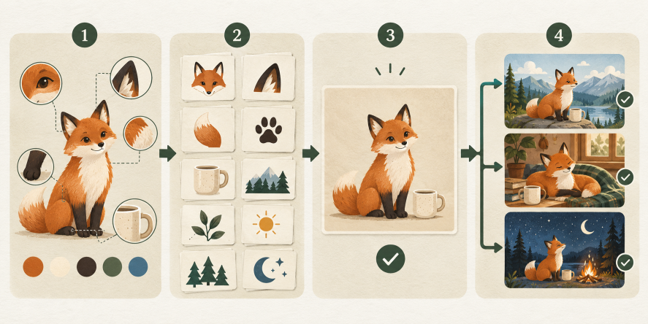
A useful reference pack is not a mood board filled with attractive pictures. It is a controlled set of visual evidence in which every image has one declared job. The pack separates identity, style, and composition so that a team can change a scene without accidentally changing the subject.
Why More Reference Images Can Create More Ambiguity
Adding references can improve direction, but quantity alone does not create control. Five images may show the same mascot with different eye colors, three lighting styles, and two jacket designs. A person can infer that some differences are unimportant; a generative system may blend them or choose the wrong one.
The same problem appears in product work. A studio photograph may establish the correct shape, while a lifestyle photograph shows a discontinued label. If both are supplied without explanation, the second image can quietly reintroduce an obsolete detail. A style reference can also conflict with an identity reference when its dramatic shadows hide features that need to remain visible.
Consistency improves when references answer separate questions: What is the subject? How should the visual feel? Where should the subject sit in the frame? A reference pack should reduce interpretation, not merely increase input.
The Three Layers of a Practical Reference Pack
The first layer is identity truth. It contains the clearest evidence of the person, character, product, or place that must remain recognizable. Use neutral lighting, readable angles, and enough resolution to inspect defining details. For a product, that may include the silhouette, material, openings, hardware, packaging, and label placement. For a character, it may include facial structure, hairstyle, proportions, signature clothing, and important accessories.
The second layer is visual language. These references describe palette, contrast, texture, lens feeling, illustration medium, or lighting direction. They should not be treated as evidence of subject identity. A useful note might say, “Use this image only for soft side lighting and muted blue shadows.” That sentence prevents a style source from becoming an accidental character or product source.
The third layer is composition intent. A rough layout, crop, or approved example can show focal-point placement, negative space, camera distance, and the area reserved for copy. Composition references are especially useful when one visual direction must be adapted into square, portrait, and landscape formats.
Each layer needs an exclusion note. Record details that must not carry into the output, such as a reference image’s logo, background object, watermark, outdated package, or embedded text. Negative instructions are not a guarantee, but they make the review criteria explicit.
How the Reference Image Workflow Works in Practice
The following process moves from scattered source material to a reviewable image series without treating every generation as a fresh experiment.
Step 1: Define the Invariants
Write a short list of features that cannot change. Keep it observable: “three black buttons,” “rounded amber bottle,” and “freckles across both cheeks” are easier to review than “same product” or “same character.” Separate permanent invariants from campaign-specific choices such as clothing, props, season, or background.
Then identify the source of truth for each invariant. If two references disagree, resolve that conflict before generation. A generator should not be asked to arbitrate which package design is current or which character sheet is approved.
Step 2: Curate Single-Role References
Choose the smallest set of images that covers the required information. Label each image by role: identity, material, style, composition, or location. When the active workflow accepts multiple references, state in the prompt what each one controls.
Remove weak references rather than keeping them “just in case.” Avoid tiny crops, heavy filters, obscured faces, extreme lens distortion, and images whose permissions are unclear. Store the original files separately from generated outputs so the evidence is never replaced by a later variation.
Step 3: Generate a Controlled Baseline
Begin with a simple scene that makes the invariants easy to inspect. Use moderate lighting, a readable pose or product angle, and a quiet background. Ask for one significant change at a time. If the first baseline drifts, fix the reference set or instruction before adding a complex location, unusual perspective, or multiple new objects.
Review the output beside the source images at comparable sizes. Check identity and geometry before judging atmosphere. An image with beautiful lighting still fails if a defining feature has changed.
Step 4: Branch, Record, and Approve
Once a baseline passes, duplicate the approved direction into named branches such as “spring-window-light” or “portrait-editorial.” Record the prompt, references, aspect ratio, intended placement, and the reason for each accepted revision. Keep rejected outputs long enough to document recurring failure patterns.
Approval should belong to a specific exported file, not to a prompt or an entire generation batch. Before publication, inspect required copy, labels, hands, reflections, small accessories, and edge details at full size. If provenance metadata is available in the production stack, preserve it; an edit history can support transparency, but it does not prove that the depicted content is accurate.
Worked Example: A Mascot Campaign with Product Variations
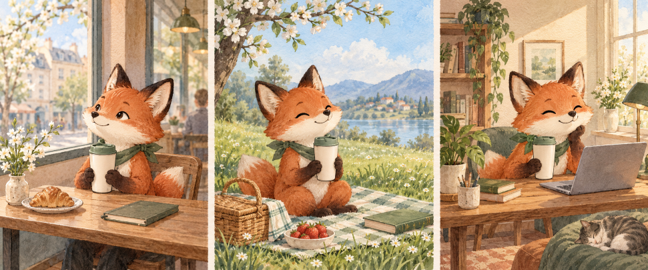
Consider a fictional coffee brand preparing three seasonal images featuring a fox mascot and the same insulated cup. The team has a mascot sheet, two product photographs, a watercolor reference, and a landscape campaign layout.
The identity layer uses one front three-quarter mascot view and one clean side view of the cup. The team records the fox’s white muzzle, dark ear tips, green neckerchief, and short rounded tail. For the cup, the invariant list includes its tapered body, matte cream finish, green lid, and vertical wordmark position.
The visual-language layer contains only the watercolor sample, labeled for paper texture, restrained edges, and a warm morning palette. The composition layer contains the landscape layout with a note that the right third must remain quiet for editable headline copy. The prompt explicitly excludes lettering from the generated image, because the campaign team will add accurate text later in a design application.
The first baseline places the mascot beside the cup against a plain warm background. After identity approval, the team creates café, picnic, and home-office branches. Each branch changes the setting while reusing the same identity references and compact invariant list. Reviewers compare the ears, muzzle, neckerchief, cup profile, lid, and wordmark area before discussing which scene feels strongest.
This example does not claim that every output will match perfectly. Its value is procedural: when drift occurs, the team can identify whether the failure came from identity, style, composition, or an ambiguous change request.
Where a Reference Pack Adds the Most Value
Brand mascots benefit because recognition depends on a small group of repeated features. A reference pack keeps those features visible while allowing pose, setting, and expression to change. It is still necessary to review anatomy and expressions individually, especially when a scene introduces interaction with objects.
Product concepts benefit when shape and material must survive a background or lighting change. Reference-led generation can accelerate exploration, but it should not replace the source photography used to verify what customers will receive. Generated product visuals should be labeled appropriately when they depict a concept rather than a real configuration.
Editorial series and storyboards benefit because the pack creates continuity across scenes. A location reference can remain stable while the camera angle changes, or a character identity can remain fixed while wardrobe states are managed as separate branches. The more frames a project contains, the more useful naming and approval rules become.
Localized campaigns benefit when the central visual must remain recognizable while copy space, cultural details, or regional settings change. Keep important wording outside the generated image whenever it needs exact spelling, translation, legal review, or frequent updates.
Reference-Pack Workflow vs Prompt-Only Generation
The table compares three production approaches across control, speed, review effort, reuse, and the situations where each one is most practical.
| Criteria | Reference-Pack AI Workflow | Prompt-Only Generation | Manual Design or Photography |
|---|---|---|---|
| Starting Point | Approved visual evidence | Written description | Original production brief |
| Consistency Control | Explicit invariants | Prompt interpretation | Direct human execution |
| First-Draft Speed | Fast after setup | Fastest to begin | Usually slower |
| Review Burden | Structured comparison | Repeated subjective review | Standard production review |
| Reuse Across Scenes | Strong with versioning | Weak without anchors | Strong but labor intensive |
| Best Use Case | Campaign exploration | One-off concepts | Final precision work |
| Main Limitation | References can conflict | Identity drifts easily | Higher time and cost |
A reference-pack workflow is most useful when a project needs repeated variation and human reviewers can define what “the same” means. Prompt-only generation remains efficient for disposable concepts where continuity is unimportant. Manual design, illustration, or photography remains the stronger choice when exact geometry, legal representation, or pixel-level control is required.
Quality and Rights Checks Before Publication
Run four gates before release. The identity gate asks whether the subject still matches the approved evidence. The context gate checks whether props, setting, scale, or expression make an unsupported claim. The delivery gate checks the actual crop, resolution, color handling, and text layer in the final placement. The rights gate confirms permission for uploaded references, recognizable people, logos, and protected artwork.
Do not assume that a long prompt creates authorship, ownership, or accuracy. Keep records of human selection, arrangement, editing, and final composition, and obtain qualified advice when copyright, publicity rights, advertising rules, or contractual obligations matter. Technical provenance can document parts of an asset’s history, but provenance alone cannot determine whether an image is truthful.
The Limits of Reference-Led Consistency
References guide generation; they do not lock pixels. A model may preserve a face while changing age cues, keep packaging colors while altering proportions, or reproduce a style while losing the intended composition. Multiple references can compete, and a successful prompt in one model or version may behave differently in another.
The safest approach is to treat generated images as candidates, not approved assets. Use a reference pack to make failure easier to detect, then use human editing or conventional production when exactness matters. Consistency is not the absence of variation. It is the disciplined preservation of the details that carry identity and meaning.
Conclusion
A reusable reference pack turns AI image consistency from a prompting wish into a production decision. By separating identity truth, visual language, and composition intent, teams can explore new scenes without losing sight of what must remain stable.
The method is most effective during concept development, campaign variation, and storyboard creation. It cannot replace rights review, factual verification, professional retouching, or exact design execution. Its practical value is that every new image starts from shared evidence and ends with a reviewable decision.